1 HPC Terminology
Modern bioinformatics tasks—genome alignment, variant calling, assembly, deep learning for protein structure—require far more compute than a laptop can provide. The HPC cluster lets you run these analyses in hours instead of weeks. This chapter covers the core vocabulary you need before submitting your first job.
1.1 CPU vs. GPU
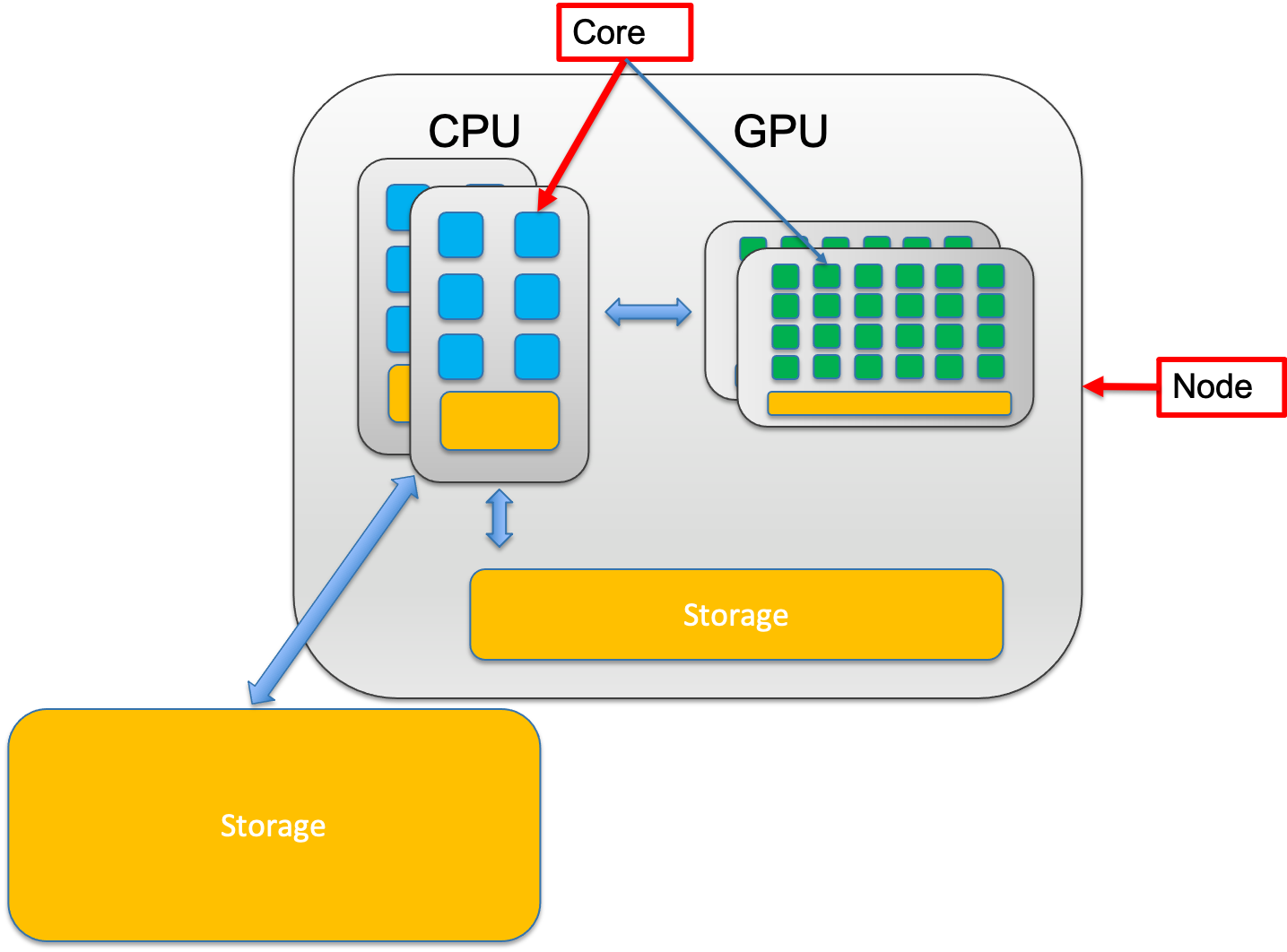
Most bioinformatics tools (aligners, variant callers, assemblers) run on CPUs, which is what your job will use by default. GPUs are specialized hardware for massively parallel workloads like deep learning (e.g., AlphaFold) — they’re only available on certain nodes and require an explicit resource request in your SLURM script.
1.2 Node vs. Core
A node is one complete computer in the cluster — it has CPUs, RAM, and a network connection to other nodes. A core is a single processing unit within a CPU; each core runs one thread at a time.
Most jobs run on a single node, which means all your cores share the same RAM and communicate quickly. You’re capped by that node’s total resources.
1.3 Memory vs. Storage
| Property | Memory (RAM) | Storage (Disk) |
|---|---|---|
| Size | 16–512 GB per node | Terabytes to petabytes |
| Speed | ~100 GB/s | 1–10 GB/s |
| Persistence | Lost when job ends | Survives power-off |
| Role | Active workspace | Long-term filing cabinet |
Rule of thumb: Raw data lives in storage. When a program runs, it loads data into RAM. A job requesting 32 GB of memory doesn’t consume 32 GB of disk — it uses 32 GB of RAM while running.
Example: A typical RNA-seq alignment needs ~32 GB of RAM but produces a ~5 GB BAM file on disk.
1.4 Cluster Architecture
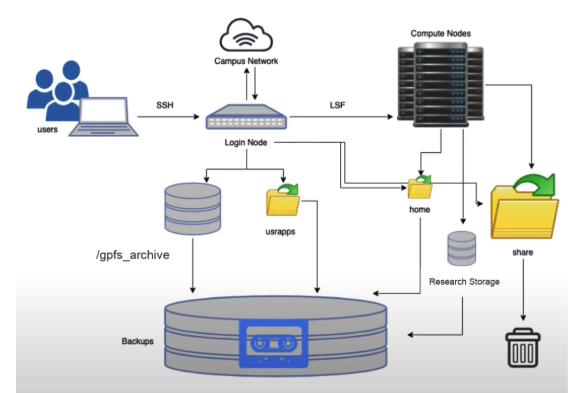
A cluster is a set of networked computers (nodes) that appear as a single system. Each node executes tasks assigned by a central job scheduler, which ensures fair resource sharing among all users.
1.4.1 Login Nodes
Your entry point — accessible via SSH from your laptop. Use them to write scripts, organize files, and submit jobs. Do not run analyses here.
Running compute-intensive tasks on a login node degrades the experience for every other user and can result in account suspension.
1.4.2 Compute Nodes
Where jobs actually run. You never SSH directly into compute nodes — SLURM assigns your job to them automatically.
1.4.3 Scheduler (SLURM)
SLURM (Simple Linux Utility for Resource Management) receives job submissions, queues them, and dispatches them to compute nodes when resources are available. You interact with SLURM via sbatch, squeue, and scancel.
1.4.4 Storage Filesystems
All compute nodes share access to the same networked storage. Your data stays in one place; nodes read and write to these shared filesystems.